Hello there,
my first post here!
Flatpaks work very well, only in a few cases flatpaks missed to launch because of outdated runtime dependencies. Not the norm, so not a big deal.
Since a month or so, some flatpaks don’t show anymore their window manager buttons (minimize, expand, close) icons, please see the attachments (flatpak is “Planify”):
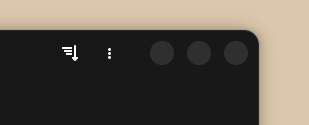
couldn’t embed more than one picture as a new user, also the light theme shows just gray buttons without icons
Buttons are just gray, and there is no change on mouse hover.
What I tried so far
sudo flatpak repair- also terminal options like
reinstallorupdatedidn’t bring wm button icons back. - to install Adwaita packages or the breeze theme packages (from Mint’s official app repo)
Luckily wm buttons work, but to not see button icons is slightly irritating. I always thought, flatpaks are self-contained and don’t need much outside resources. Well, probably I uninstalled some theme on my system, not knowing that it was necessary for flatpak themes.
Question
- how to update or edit theme preferences to point to the right resources of wm buttons?
- what themes are required to get wm button icons?
Linux Mint Cinnamon 21.3